New · OSCE stations for institutions

OSCE stations that show you how your students think.

A timed station with an AI virtual patient and a Virtual Examiner beside every learner. Every question, request and working diagnosis is recorded, so clinical reasoning becomes something your faculty can see, compare and teach from.

Station guide: a 6-page PDF on each part of a station and why it matters.

MEKSI · OSCE station
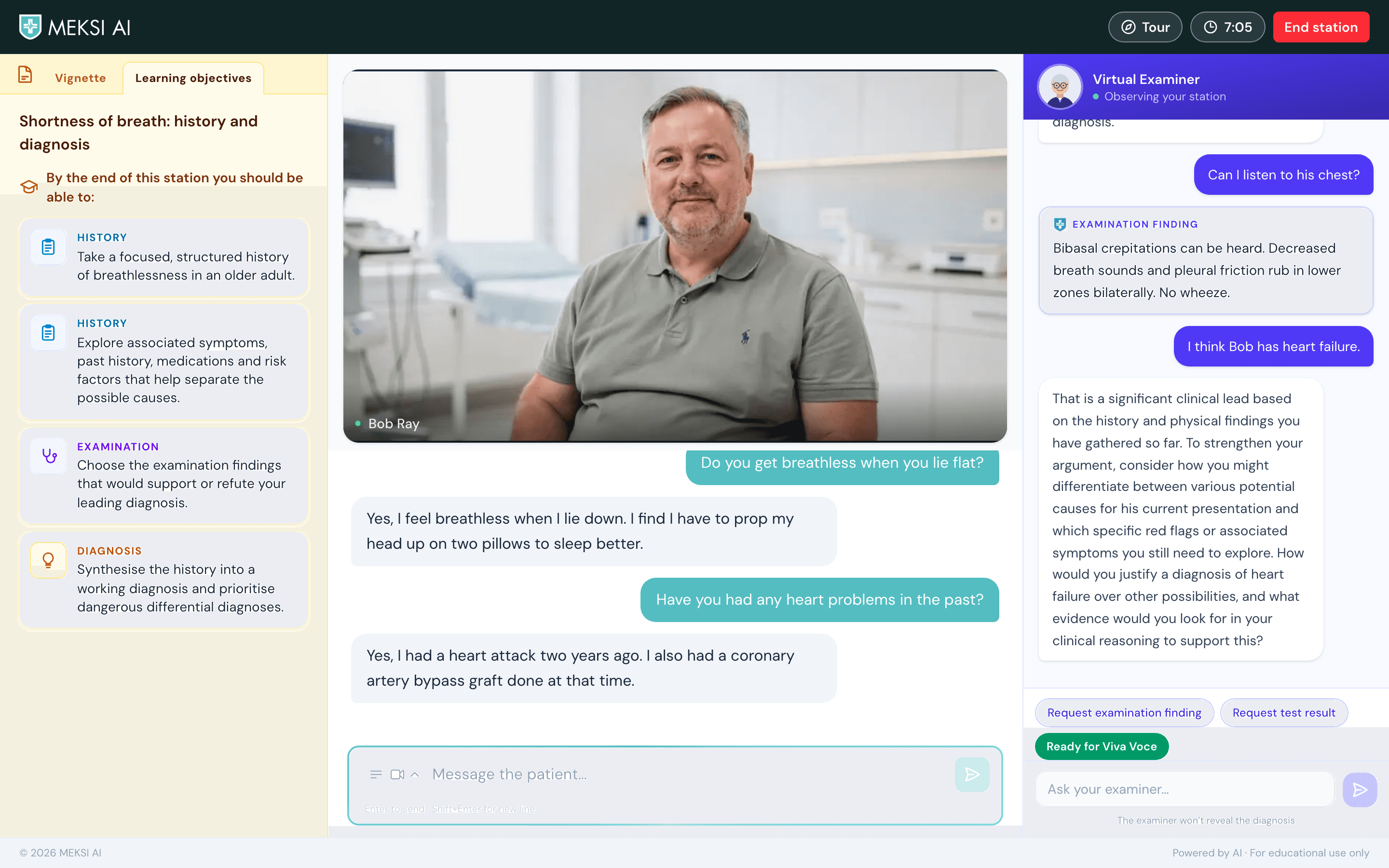
A MEKSI OSCE station: the learning objectives on the left, the virtual patient Bob Ray answering on video in the centre, and the Virtual Examiner on the right.

See it run

One station, start to finish

A learner takes Bob Ray's history, tests a hypothesis with the Virtual Examiner, answers the Viva Voce and gets the station scorecard, in under 90 seconds.

Why it matters

An OSCE examiner sees what a student did. Rarely why.

Clinical reasoning happens between the questions. MEKSI stations keep the format your students will be examined in, and add a record of how they got to their answer.

Standardised

Every learner gets the same instructions, the same patient and the same examiner, so performance can be compared fairly across a cohort.

Observable

Each question, request and working diagnosis leaves a trace. You see the path a student took, not only where they ended up.

Repeatable

Students can run a station whenever they need to, without anyone booking a standardised patient or an examiner.

Inside a station

Five parts, one live clinical encounter

Bob Ray, 65, is short of breath. Here is what your students see, and what each part tells you about their reasoning.

MEKSI · OSCE station
A MEKSI OSCE station: the learning objectives on the left, the virtual patient Bob Ray answering on video in the centre, and the Virtual Examiner on the right.
  1. 1Station card
  2. 2Virtual patient
  3. 3Virtual Examiner
  4. 4Consultation input
  5. 5Examiner actions
The station card: the station title and four learning objectives covering history, examination and diagnosis.
1

Station card

Left panel · Vignette and Learning objectives

Sets the scene the way a real OSCE does: who the patient is, the setting, the time allowed and the tasks. It never hints at the diagnosis.

  • A standardised challenge

    Every learner gets the same instructions, so performance can be compared fairly across a cohort.

  • Learning objectives up front

    A second tab sets out what the station is designed to teach, from history-taking to prioritising dangerous differentials.

  • Independent prioritisation

    Learners decide for themselves what matters, recognise risk early and plan a focused consultation.

For educators and researchers

How does the way a task is framed shape the relevance, order and safety of a learner's clinical decisions?

The virtual patient Bob Ray on video, with the conversation below: he says he gets breathless lying flat and had a heart attack two years ago.
2

Virtual patient

Centre · patient video and conversation

Learners don't read a history; they take one. The patient answers in his own words, on video, in a voice or in text, so learners have to find the information themselves.

  • Active data gathering

    Learners choose their questions, draw out pertinent positives and negatives and follow up on what emerges.

  • Diagnostic discrimination

    Questions can test competing explanations, such as cardiac, respiratory and other causes of breathlessness.

  • Iterative reasoning

    Each answer feeds hypothesis generation, targeted questioning and continuous re-evaluation.

For educators and researchers

Which patterns of enquiry lead to more complete and clinically relevant information gathering?

The Virtual Examiner panel: an examination finding of bibasal crepitations, then the examiner asking the learner to justify a diagnosis of heart failure over other possibilities.
3

Virtual Examiner

Right panel · always beside the station

An examiner sits beside every station. Learners can ask for observations, examination findings and test results, or talk through their thinking, but the examiner won't reveal the diagnosis.

  • Process, not just the answer

    A correct diagnosis doesn't show whether the alternatives, the risks or the evidence were weighed. The examiner asks about them.

  • Natural viva questioning

    Open prompts such as “How would you justify that over other possibilities?” draw out reasoning without giving it away.

  • Findings on request

    Examination findings and results appear only when the learner asks for them, so every request is a visible decision.

For educators and researchers

Does targeted examiner questioning surface reasoning that the consultation alone would not show?

The consultation: the learner's questions to the patient and his replies, above the message box.
4

Consultation input

Centre · the learner's message box

Where the learner talks to the patient. They can type or speak, and switch between video, voice and text replies at any time.

  • An observable consultation

    The wording and order of questions leave a clear trace of what the learner chose to explore.

  • Communication and relevance

    Educators can review clarity, specificity and whether the safety-critical questions were asked.

  • Feedback on omissions

    Every recorded encounter supports case-specific feedback on missed red flags and discriminating history.

For educators and researchers

A transcript shows what a learner said, not everything they thought. How far can it be read as evidence of reasoning?

The examiner actions: buttons to request an examination finding or a test result, a Ready for Viva Voce button, and a box to ask the examiner.
5

Examiner actions

Right panel · findings, results and the Viva Voce

One-tap requests for an examination finding or a test result, a direct line to the examiner, and the Viva Voce that closes the station.

  • Decision points made visible

    Each request for an examination or investigation can be judged on its relevance, timing and patient safety.

  • Integration of evidence

    What the learner does next shows whether new findings confirm, revise or overturn their hypotheses.

  • An adaptive Viva Voce

    The closing viva probes what the learner left out and follows up partial answers, then hands over to the station scorecard.

For educators and researchers

Can linking requests, interpretations and later decisions produce more useful formative feedback?

After the station

Evidence you can teach from

Every station ends with a scorecard for the learner and adds to the picture of the whole class for you.

A station scorecard

Points for each task and for the Viva Voce, with the items a learner missed called out by name, so feedback starts from what actually happened.

A Viva Voce that probes

The closing viva asks about what the learner left out and follows up partial answers, the way a good examiner would.

A view of the whole class

Faculty see task and Viva Voce points across the cohort under stable pseudonyms, never names. A professor sets up a class link and QR code themselves.

Bring OSCE stations to your cohort

Tell us about your course and what you want your students practising. We'll walk you through a live station and talk through access for your faculty and students. Data and security questions welcome.

See how we handle data